Payment & Subscription
Welcome to the Payment & Subscription for employers on HST Sira!
This guide covers Managing subscription plans, payments, budgets, and transaction history in a unified interface.
- Navigate to Payment & Subscription.
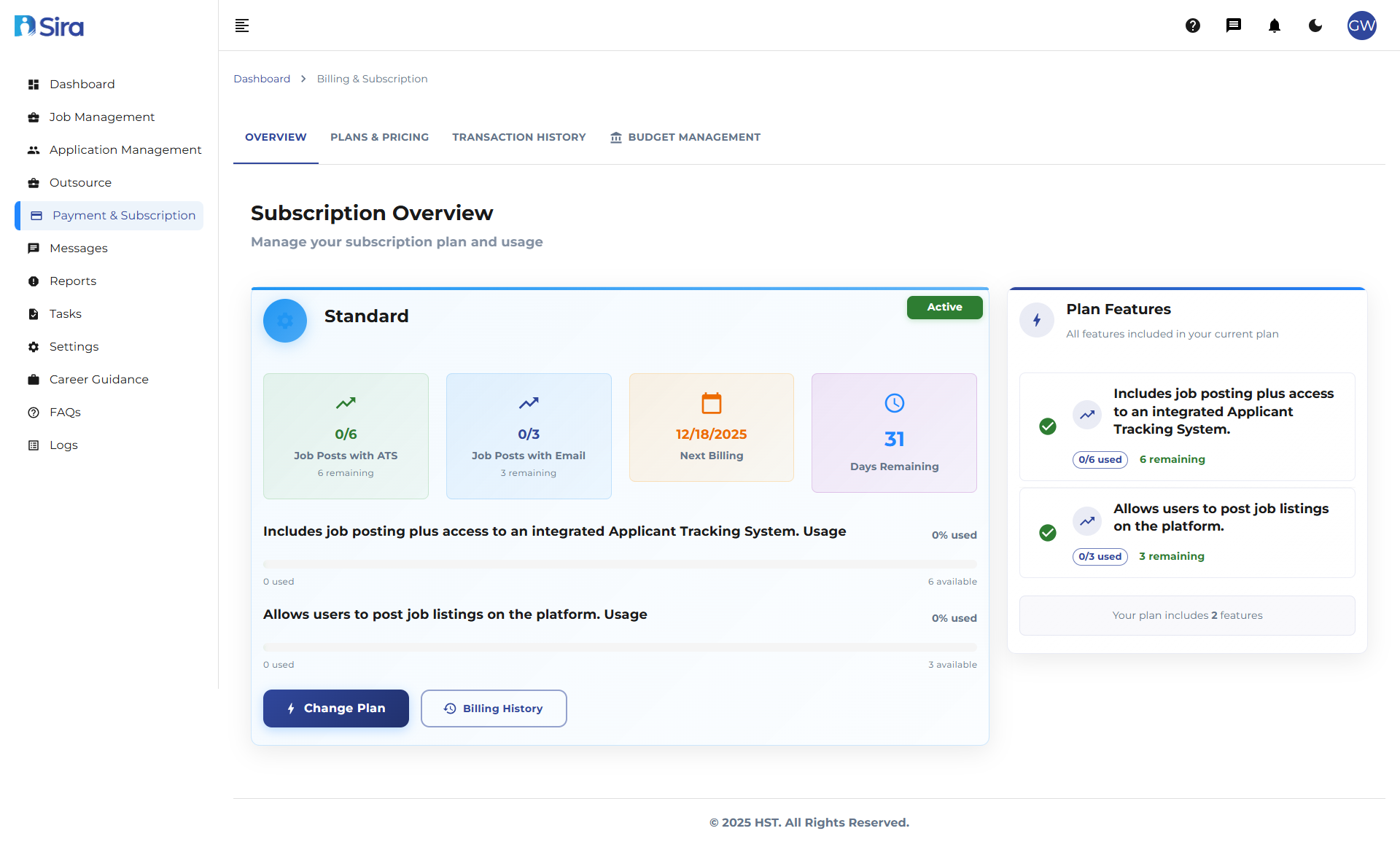 In this section, you can see overview of current plan and other tabs
Navigation Structure
- OVERVIEW - Current subscription status and usage
- PLANS & PRICING - Available plans and feature comparison
- TRANSACTION HISTORY - Payment records and billing details
- BUDGET MANAGEMENT - Budget allocation and tracking
Overview Section
Components
- Plan name display
- Usage metrics in X/Y format
- Remaining counts
- Next billing date
- Days remaining counter
- Feature usage tracking
- Change Plan button
- Billing History button
Plans & Pricing Section
- Navigate to Payment & Subscription -> Plans & Pricing Tab.
 In this section, you can see list of plans and their feature
Components
- Plan names with billing periods
- Monthly pricing display
- Feature lists with bullet points
- VAT exclusion notice
- Feature comparison table
- Get Started call-to-action
Transaction History Section
- Navigate to Payment & Subscription -> Transaction History Tab.
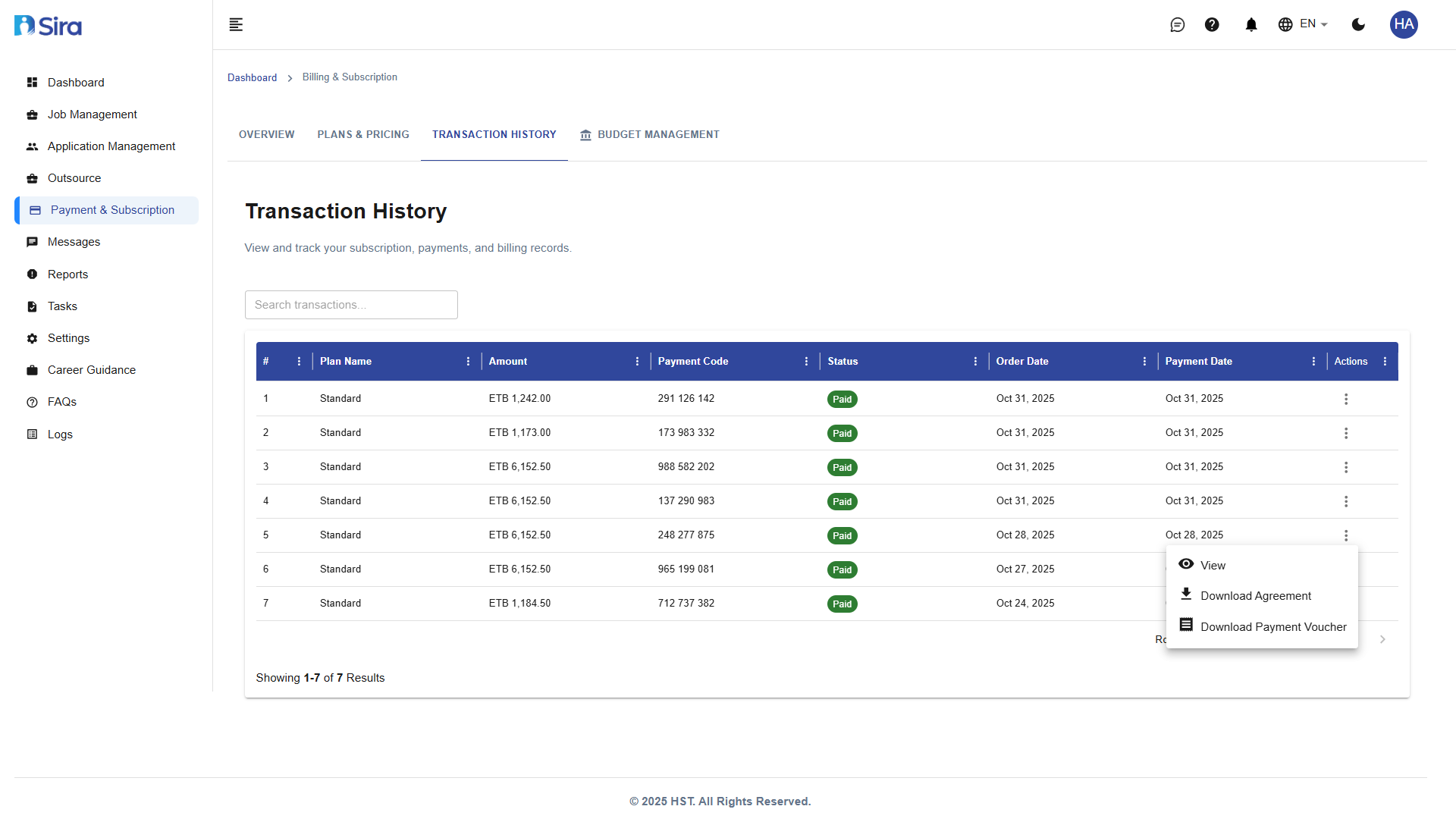
 In this section, you can see list of transaction history of subscriptions and view detail of an individual transaction
Components
- Search functionality
- Plan Name: Indicates the name or title of the selected payment plan.
- Amount: Shows the total payable amount for the plan.
- Payment Code: Represents a unique code assigned to each payment transaction.
- Status: Reflects the current state of the payment .
- Order Date: Specifies the date the order or plan was created.
- Payment Date: Indicates when the payment was made or processed.
- Actions: Provides options to view details, download the agreement, or download the payment voucher.
Budget Management Section
- Navigate to Payment & Subscription -> Budget Management Tab.

 In this section, you can see list of Budgets & view detail of individual budget
Components
- Search functionality
- Budget Title: Specifies the name or heading of the budget.
- Description: Provides a brief summary or details about the purpose of the budget.
- Budget Year: Indicates the fiscal year to which the budget applies.
- Estimated Cost: Shows the projected or planned amount allocated for the budget.
- Action: Allows users to view or edit the budget details as needed.
Add New budget
- Navigate to Payment & Subscription -> Budget Management Tab -> Add New Budget button.
 In this section, you can add new budget
- Budget Title (Required)
- Description (Optional)
- Estimated Cost (Required)
- Budget Year (Required)
Best Practices
1. Subscription Management
- Regular Plan Review
- Monitor usage metrics monthly to ensure your plan meets current needs
- Review feature usage to optimize subscription costs
- Check remaining job posts and applicant limits regularly
2. Billing Cycle Management
- Note next billing date and set calendar reminders
- Track days remaining to avoid service interruptions
- Review billing history quarterly for accuracy
3. Plan Selection
- Compare features across plans before upgrading or downgrading
- Consider seasonal hiring needs when selecting plans
- Evaluate cost-per-hire metrics when choosing plan levels
4. Budget Planning
- Create annual budgets aligned with fiscal year planning
- Use descriptive titles for easy identification and tracking
- Include detailed descriptions for budget purpose and scope
5. Budget Monitoring
- Review budget utilization quarterly
- Compare estimated vs. actual costs for future planning
- Update budgets when hiring needs or market conditions change
6. Record Keeping
- Download and save payment vouchers for accounting purposes
- Maintain organized records of all subscription agreements
- Track payment codes for easy reference and dispute resolution
Troubleshooting
Common Issues
Issue: Usage counts not updating
- Refresh page or check sync status
- Verify internet connection
Issue: Billing date incorrect
- Verify timezone settings
- Check system date configuration
- Confirm billing cycle settings
Issue: Transactions not appearing
- Confirm user permissions
Issue: Download buttons not working
- Verify file permissions
- Check browser download settings
Issue: Payment status incorrect
- Sync with payment gateway
- Check transaction log files
Issue: Budget not saving
- Check required field completion
- Verify cost format validation
- Confirm data type requirements
Issue: Search not returning results
- Verify search criteria
- Check for special characters
Need Assistance?
- Contact customer support
- Refer to FAQs section for common questions
- Contact system admin for technical issues