Overview
Welcome to the Career Guidance Guide for employers on HST Sira!
This guide explains how to create,update and manage career guidance content in the system.
- Navigate to Career Guidance.
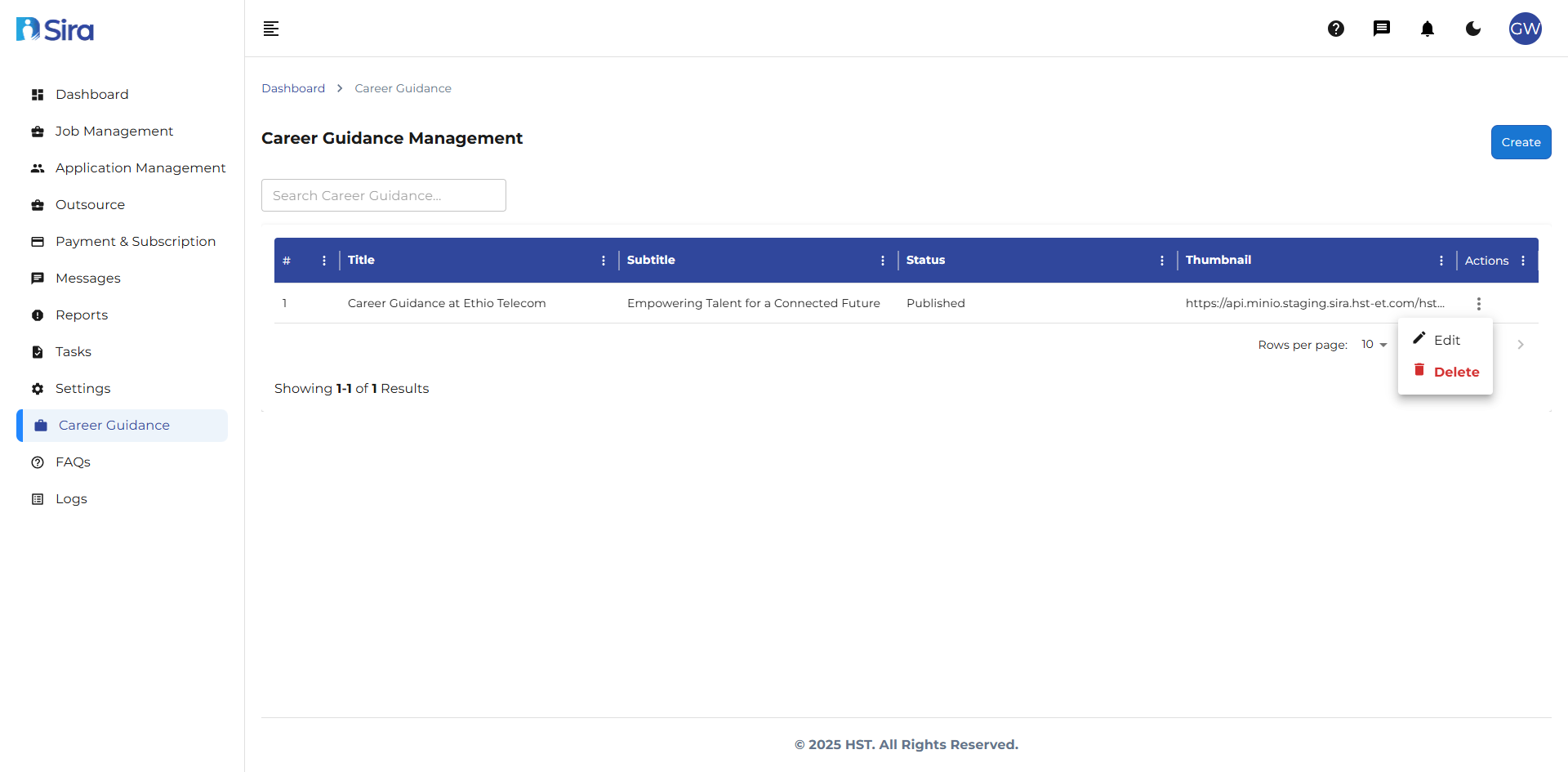 In this section, you can see career guidance lists
1. Career Guidance Table
Understanding the career guidance List
The main table shows all your job postings with this information:
- Title: The name of the career position or topic covered in the video.
- Subtitle: The specific job field, department, or area of expertise the video focuses on.
- Status: Indicates the current stage of the (Published or Draft)
- Thumbnail: displays the video link/ images
- Tag Count:
- Actions: Available operations for each career guidance
2. Career Guidance Actions Menu
For each career guidance in your list, you can:
- ✏️ Edit: Modify job information
- ❌ Delete: See full job details
Best Practices
Content Creation
-
Clear Titling
- Use descriptive, search-friendly titles
- Include job roles or career paths in titles
- Keep titles concise but informative
-
Effective Subtitling
- Specify the exact field or department
- Use industry-standard terminology
- Make subtitles complementary to main titles
-
Tag Management
- Use relevant, specific tags for better searchability
- Maintain consistent tagging across similar content
- Regularly review and update tag lists
-
Status Management
- Use "Draft" for content still in development
- Only publish when content is complete and reviewed
- Regularly review and update published content
Thumbnail Optimization
- Use high-quality, relevant images
- Ensure thumbnails accurately represent content
- Maintain consistent sizing and aspect ratios
- Optimize file sizes for faster loading
Content Organization
- Group related career guidance topics
- Use consistent formatting across all content
- Regularly audit and update existing guidance
Quality Assurance
- Proofread all content before publishing
- Verify all links and media are working
- Ensure information is current and accurate
- Test content display on different devices
Troubleshooting
Common Issues
Content Creation Problems:
- "Title already exists": Use a unique title for each career guidance item
- "Required field missing": Ensure all mandatory fields are completed
- "File upload failed": Check file size and format requirements
Editing Difficulties:
- "Changes not saving": Check internet connection and try refreshing
- "Edit option not available": Verify user permissions for content editing
- "Content locked for editing": Another user may be currently editing the item
Deletion Issues:
- "Cannot delete published content": Change status to Draft before deletion
- "Delete option missing": Check user role and deletion permissions
- "Error during deletion": Ensure content is not referenced elsewhere
Display Problems:
- "Thumbnail not showing": Verify image URL or re-upload the file
- "Content not appearing in list": Check status filters and search criteria
- "Formatting issues": Review content in preview mode before publishing
Status Management Issues:
- "Cannot change status": Verify all required fields are completed
- "Draft status reverting": Ensure proper save procedures are followed
Tag Management Problems:
- "Tags not saving": Verify tag format and character limits
- "Tag count incorrect": Refresh page to update tag counts
- "Cannot add new tags": Check tag creation permissions
Technical Issues:
- "Slow loading": Optimize image sizes and check internet connection
- "Button not responding": Refresh page or try different browser
- "Error messages": Note error code and contact technical support
Need Assistance?
- Contact customer support
- Refer to FAQs section for common questions
- Contact system admin for technical issues