Reports
Welcome to the Reports for employers on HST Sira!
The Job Performance Analytics dashboard provides comprehensive insights into your job posting performance, application metrics, and recruitment effectiveness.
- Navigate to Reports.
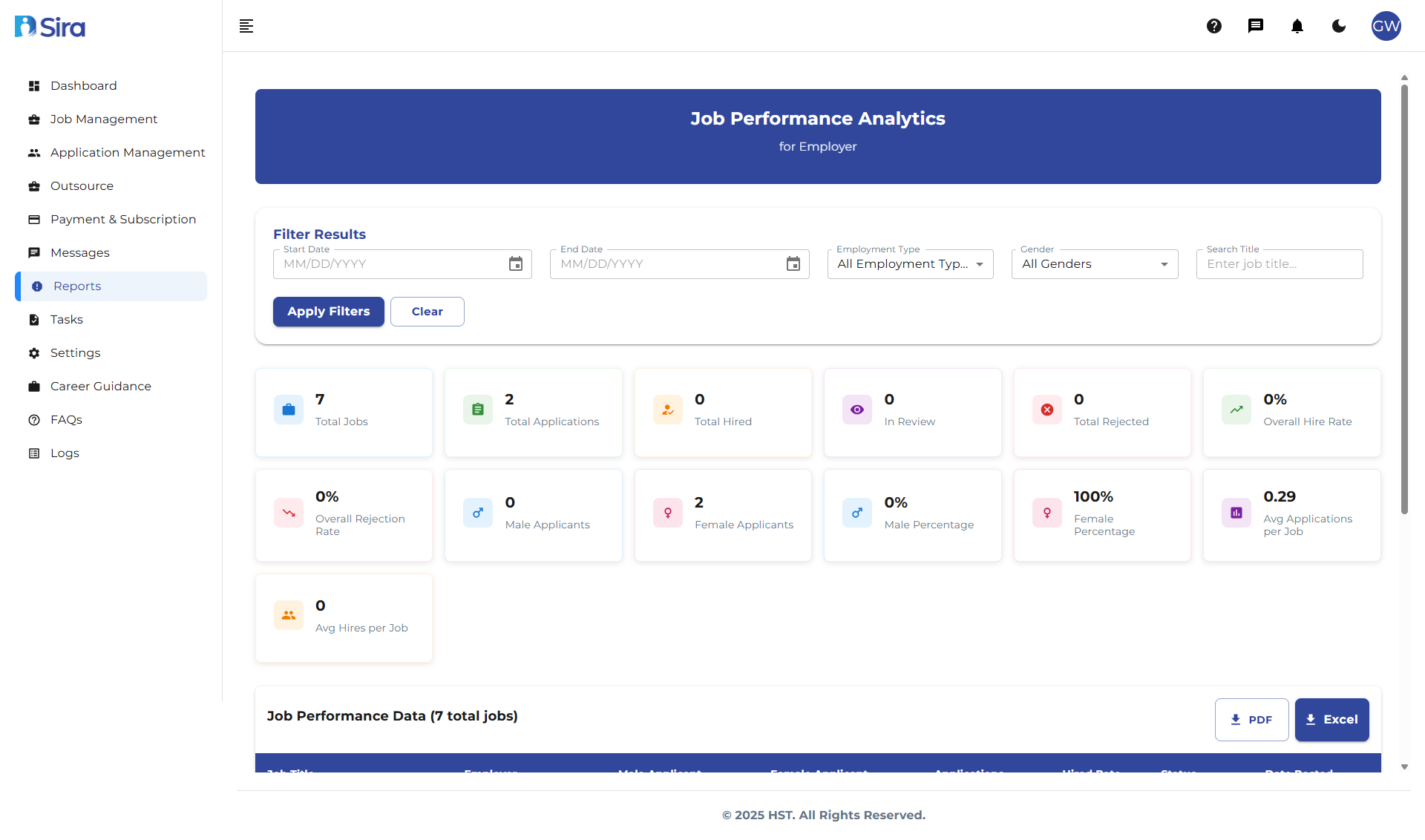 In this section, you can see Job performance analytics and reporting
Filtering Results
Available Filters
Start Date:
- Select beginning date for analysis period
End Date:
- Select ending date for analysis period
Employment Type:
- Filter by: Full-time, Part-time, Contract, etc.
Gender:
- Filter applications by gender distribution
Search Title:
- Search for specific job titles
Filter Actions
- Apply Filters - Execute filtering with selected criteria
- Clear - Reset all filters to default values
Key Performance Metrics
Summary Statistics
Total Jobs:
- Number of jobs posted within filter period
Total Applications:
- Total number of applications received
Total Hired:
- Number of successful hires made
In Review:
- Applications currently under consideration
Total Rejected:
- Number of applications rejected
Performance Rates
Overall Hire Rate:
- Percentage of applications that result in hires
Overall Rejection Rate:
- Percentage of applications rejected
Gender Distribution
-
Male Applicants: Number of male applicants
-
Male Percentage: Percentage of total applications from males
-
Female Applicants: Number of female applicants
-
Female Percentage: Percentage of total applications from females
Additional Metrics
Total Rejection Rate:
- Comprehensive rejection percentage across all criteria
Average Applications per Job:
- Mean number of applications received per job posting
Job Performance Data Table
Table Structure
The main data table displays detailed performance for each job posting:
| Column | Description |
|---|---|
| Job Title | Name of the position |
| Employer | Company or department name |
| Views | Number of times job was viewed |
| Clicks | Number of clicks on application links |
| Applications | Number of applications received |
| Conversion Rate | Application-to-view ratio |
| Status | Current job status (Active, Closed, etc.) |
| Date Posted | When the job was published |
Exporting and Reporting
Data Export
- Export table data to CSV/Excel formats
- Generate PDF reports for stakeholders
- Schedule automated report deliveries
Custom Reporting
- Create custom date range comparisons
- Filter by specific departments or locations
- Generate performance trend analysis
Best Practices
Regular Monitoring
- Check analytics weekly during active recruitment
- Monitor conversion rates for new postings
- Track gender distribution for diversity goals
Actionable Insights
For Low Performance Jobs:
- Optimize job titles and descriptions
- Adjust posting channels and timing
- Review application process complexity
For High Performance Jobs:
- Replicate successful strategies
- Analyze what attracts quality candidates
- Use as benchmarks for other positions
Data-Driven Decisions
- Use metrics to justify recruitment budget
- Identify most effective job boards
- Optimize posting schedules based on engagement data
Troubleshooting
Common Issues
Missing Data:
- Verify date range includes active posting periods
- Check if filters are too restrictive
- Ensure job status is set to "Active" for current postings
Inconsistent Metrics:
- Allow 24-48 hours for data synchronization
- Verify tracking codes are properly implemented
- Check for duplicate job entries
Access Problems:
- Confirm user permissions for analytics access
- Verify subscription includes advanced analytics
- Contact support for access issues
Need Assistance?
- Contact customer support
- Refer to FAQs section for common questions
- Contact system admin for technical issues