Overview
Welcome to the Application Management Guide for employers on HST Sira!
This document explains manage Applications and applicants on the platform including both Internal and External job types.
- Navigate to Application Management.
 In this section, you can see job lists,action menu and total count status
1. List Job posted
Understanding the Job List
The main table shows all your job postings with this information:
- Job Title: Name of the position
- Category: Job field/department
- Job Type: Internal/ External
- Status: Current state (Open/Closed)
- Deadline: Application closing date
- Actions: Available operations for each job
2. Application Actions Menu
For each job in your list, you can:
- 👁️ View: See full job details
- 📤 Go To Application: Manage applications and applicant
3. Viewing Job Details
- Navigate to Application Management → On Action Menu click View.
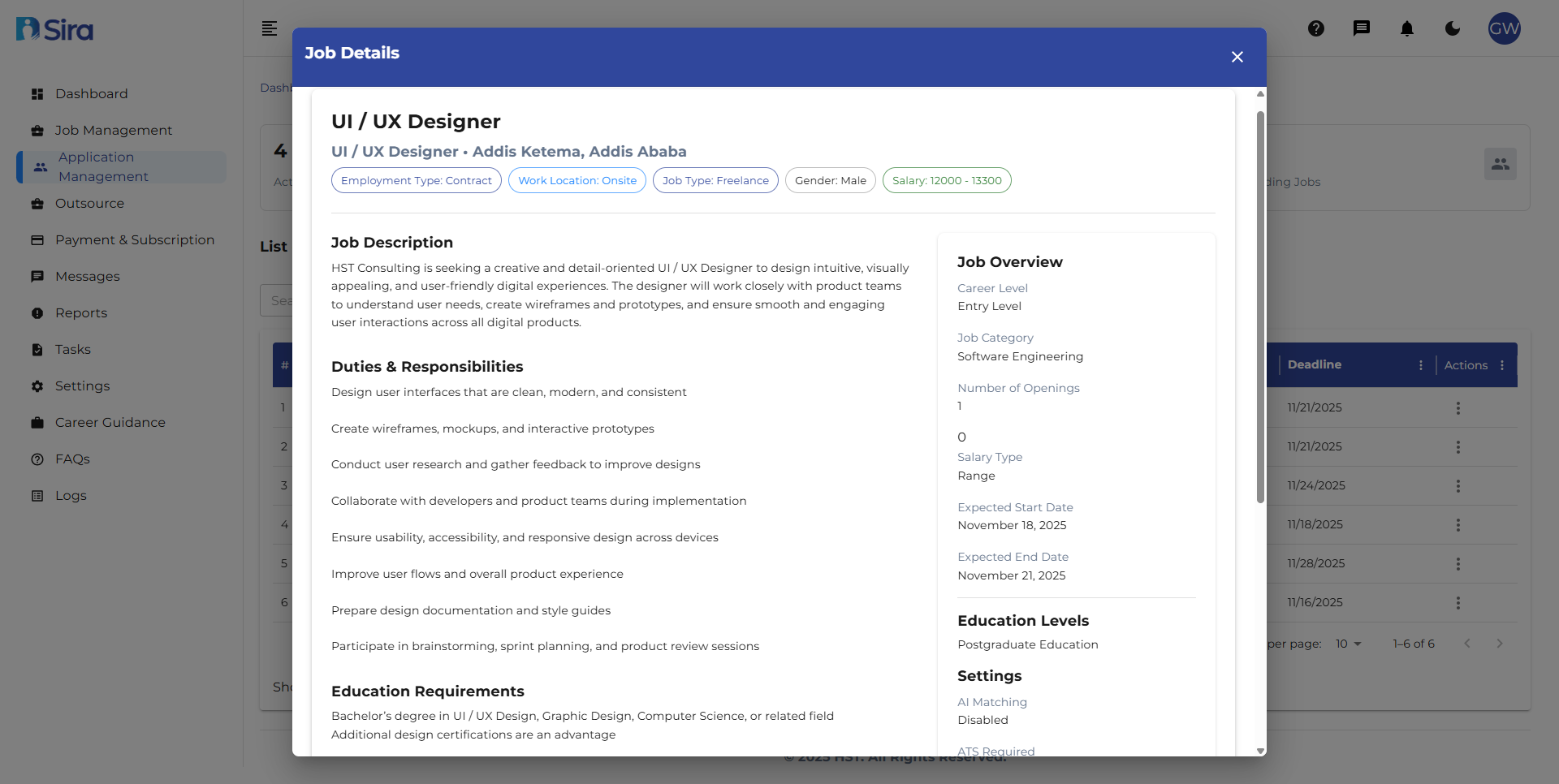 In this section, you can see Detail information for the job clicked view
Essential Information Panel
- Employment Type, Location, Salary
- Post Date and Deadline
- Career Level and Category
Job Metrics
- Number of open positions
- Application statistics
Full Job Description
- Complete role description
- Duties & Responsibilities list
- Education and Experience requirements
Need Assistance?
- Contact customer support
- Refer to FAQs section for common questions
- Contact system admin for technical issues